One connected learning ecosystem

Author with clarity.
Deliver without limits.

Impression Smart Studio brings structured authoring and a flexible runtime framework together—so your content, presentation, and behavior work as one system.

  • Visual authoring
  • Open XML content
  • SCORM delivery
Smart StudioShared content model
SScribeAuthor
RRuntimeDeliver
XMLSCORMAI
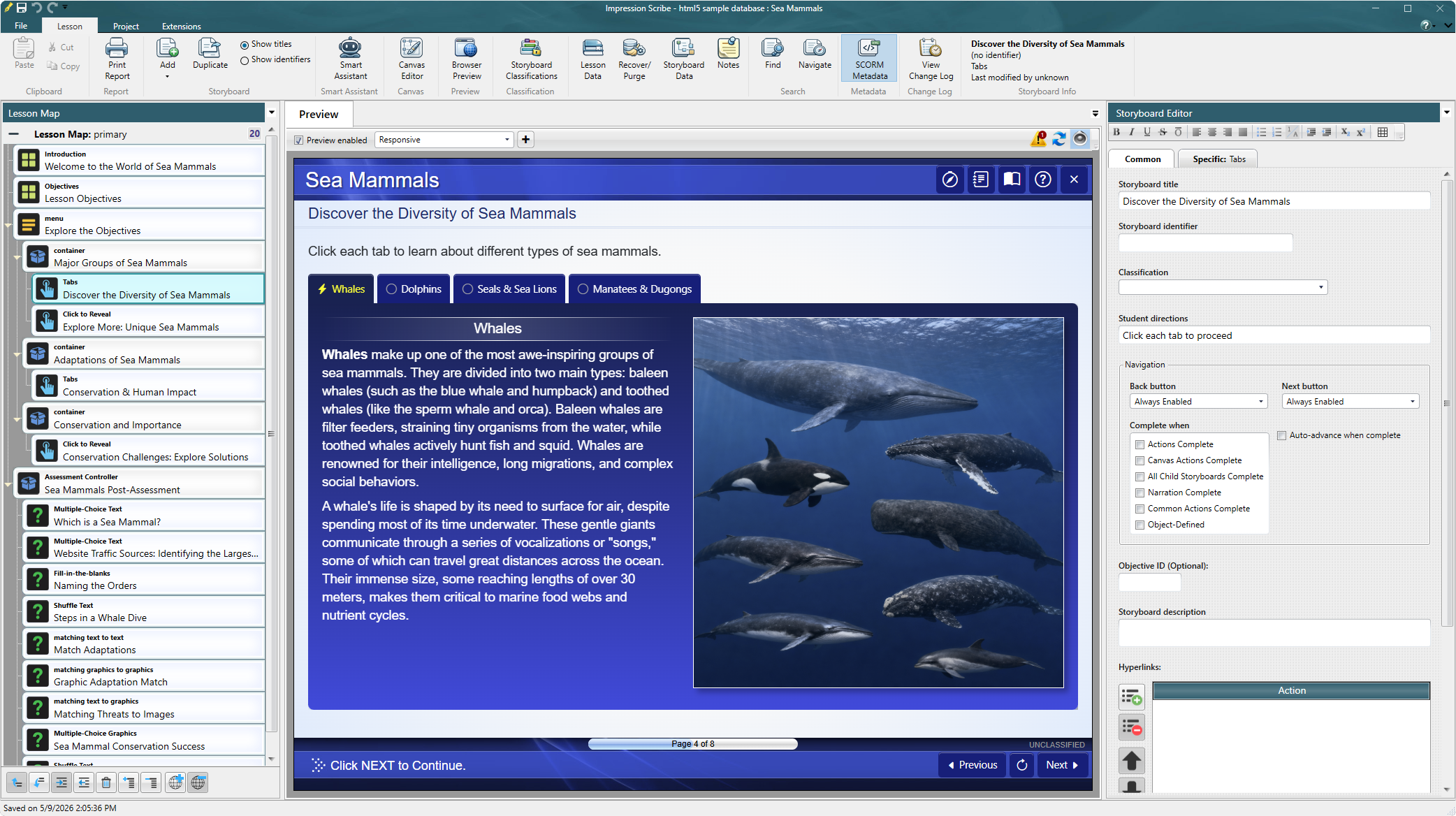
Impression Scribe Live preview
Impression Scribe showing a structured lesson map, live course preview, and storyboard editor
01Structure stays visibleSee the lesson, screen, and data together.
02Preview while you authorMove from intent to working courseware.

The complete studio

Two core components.
One continuous workflow.

Smart Studio keeps instructional structure separate from presentation while connecting both through a common, portable content model.

01

Authoring component

Impression Scribe

Build lessons as meaningful instructional structures—not a loose collection of slides. Author content, interactions, assessments, branching, and simulations in one visual environment.

  • Structured lesson and storyboard editing
  • Visual canvas and live preview
  • AI-assisted research and content creation
  • Reusable templates and project standards
Follow the authoring workflow
02

Delivery component

Impression Runtime Framework

Turn the same structured content into a tailored learning experience. The runtime handles presentation, navigation, interactions, scoring, and LMS communication while remaining extensible.

  • Responsive, reusable presentation layer
  • Custom behavior and interaction support
  • Simulation-ready architecture
  • SCORM packaging and LMS communication
See how content reaches learners

Built around your content

The course is the data.
The experience is yours.

Smart Studio stores instructional content in an open XML structure. That durable source can move through different viewers, projects, and delivery requirements without locking the course to one visual treatment.

“Create, don’t customize.”
Design the runtime around the learning requirement—not the other way around.
</>

Open by design

Human-readable XML keeps content portable, inspectable, and ready for reuse.

Structure first

Objectives, storyboards, interactions, and remediation remain a coherent system.

Extend when needed

Use built-in patterns or create project-specific runtime behavior.

From idea to delivery

A connected production path

Every stage contributes to the same structured source, reducing handoffs and keeping instructional intent intact.

  1. 01

    Explore

    Research, outline, and develop the instructional approach with integrated assistance.

  2. 02

    Author

    Shape lessons, storyboards, media, interactions, assessments, and simulations.

  3. 03

    Preview

    Review the learner experience while the content is still editable.

  4. 04

    Deliver

    Package and deploy through the runtime framework and your learning environment.

Intelligence in context

AI that works inside the authoring process.

Use Smart Assistant to research, draft, revise, and create supporting imagery while Scribe keeps the result grounded in the lesson’s actual structure.

The output remains editable content—not a conversation stranded outside your production workflow.

Get Smart Studio

Impression Smart Studio

Build the learning experience you actually designed.

Choose monthly flexibility or annual billing. Bring the complete Smart Studio ecosystem to your Windows authoring computer.